> ## Documentation Index
> Fetch the complete documentation index at: https://help.micredit.io/llms.txt
> Use this file to discover all available pages before exploring further.

# TonKeeper使用指南

> 介绍如何使用TonKeeper钱包

如何使用TonKeeper钱包

## 下载TonKeeper钱包APP

<AccordionGroup>
  <Accordion icon="github" title="TonKeeper钱包下载">
    [TonKeeper安卓版本（谷歌Playstore下载）](https://play.google.com/store/apps/details?id=com.ton_keeper)

    [TonKeeper安卓版本（官方APK），地址可能会随版本变动](https://github.com/tonkeeper/android/releases/download/v5.0.21/Tonkeeper_965.apk)

    [TonKeeper苹果手机](https://apps.apple.com/us/app/tonkeeper-ton-wallet/id1587742107)
  </Accordion>
</AccordionGroup>

下载完成后，点击App Logo启动钱包程序

## 创建钱包

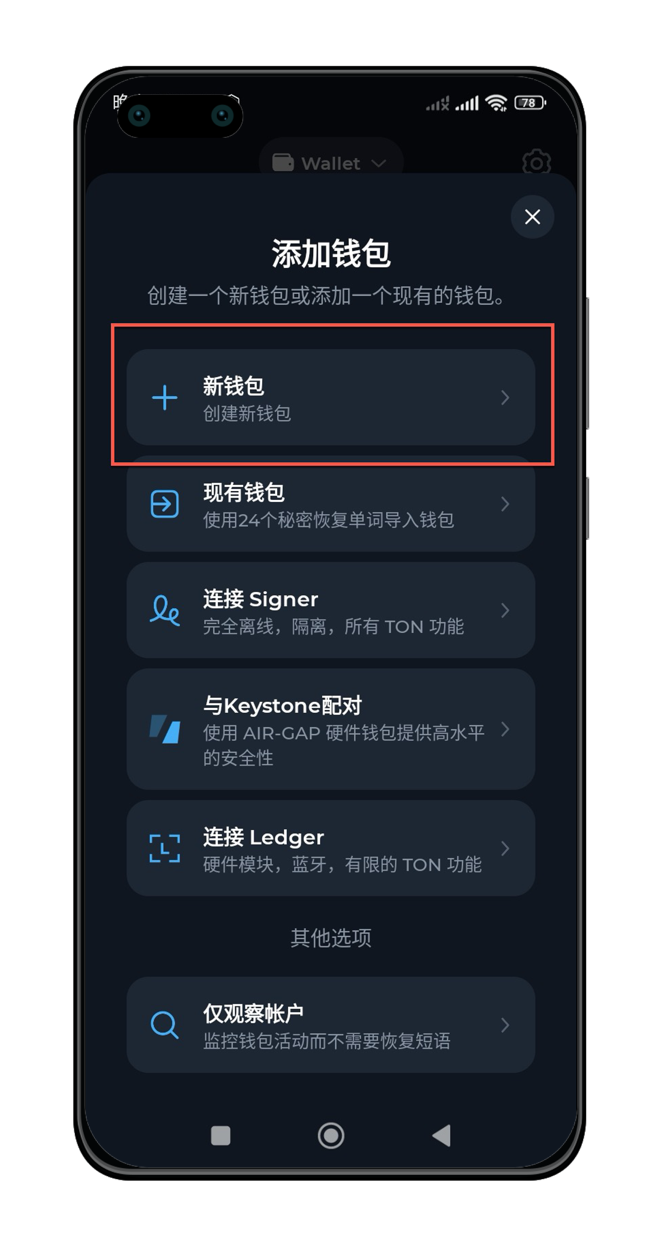
根据APP运行提示，创建一个钱包。

### 选择【新建钱包】

<img src="https://mintcdn.com/microcredit/ztxEmAWsKGCThrhV/images/wallet-tonkeeper-guide/tonkeeper-guide-01-portrait.png?fit=max&auto=format&n=ztxEmAWsKGCThrhV&q=85&s=4a3cad8dd47ce4088b028cc2771dc5cf" width="400" data-path="images/wallet-tonkeeper-guide/tonkeeper-guide-01-portrait.png" />

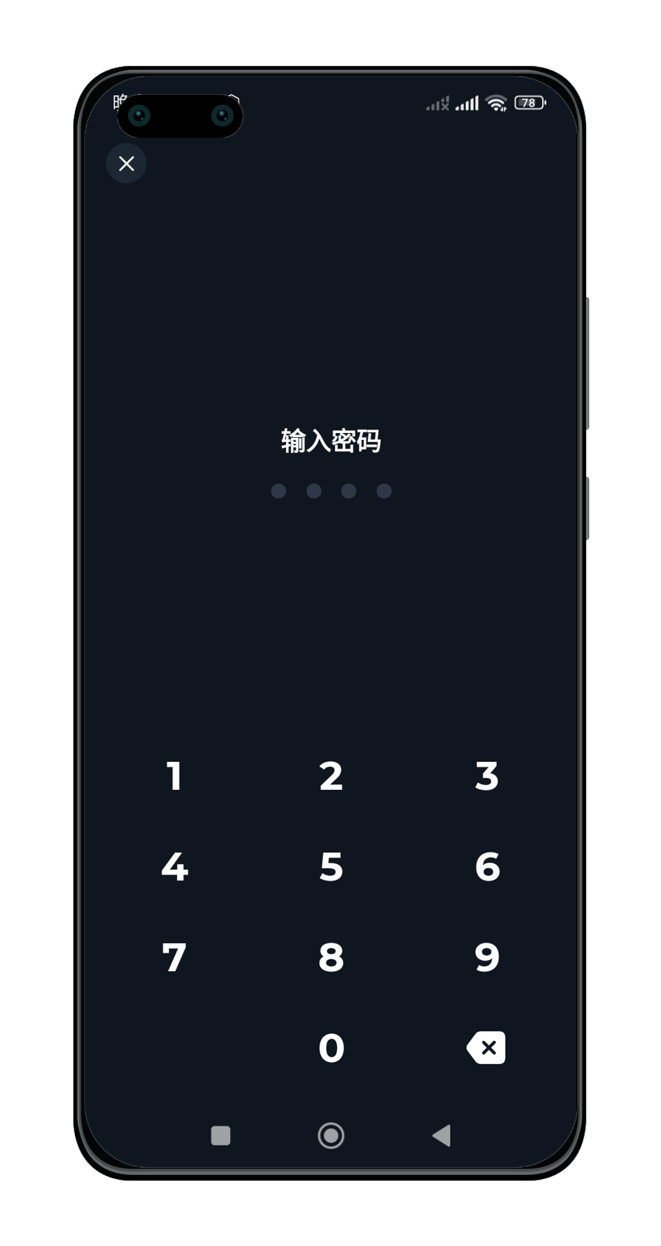
### 设置密码

<img src="https://mintcdn.com/microcredit/ztxEmAWsKGCThrhV/images/wallet-tonkeeper-guide/tonkeeper-guide-02-portrait.png?fit=max&auto=format&n=ztxEmAWsKGCThrhV&q=85&s=600998320a7089888c0897f1b15878cd" width="400" data-path="images/wallet-tonkeeper-guide/tonkeeper-guide-02-portrait.png" />

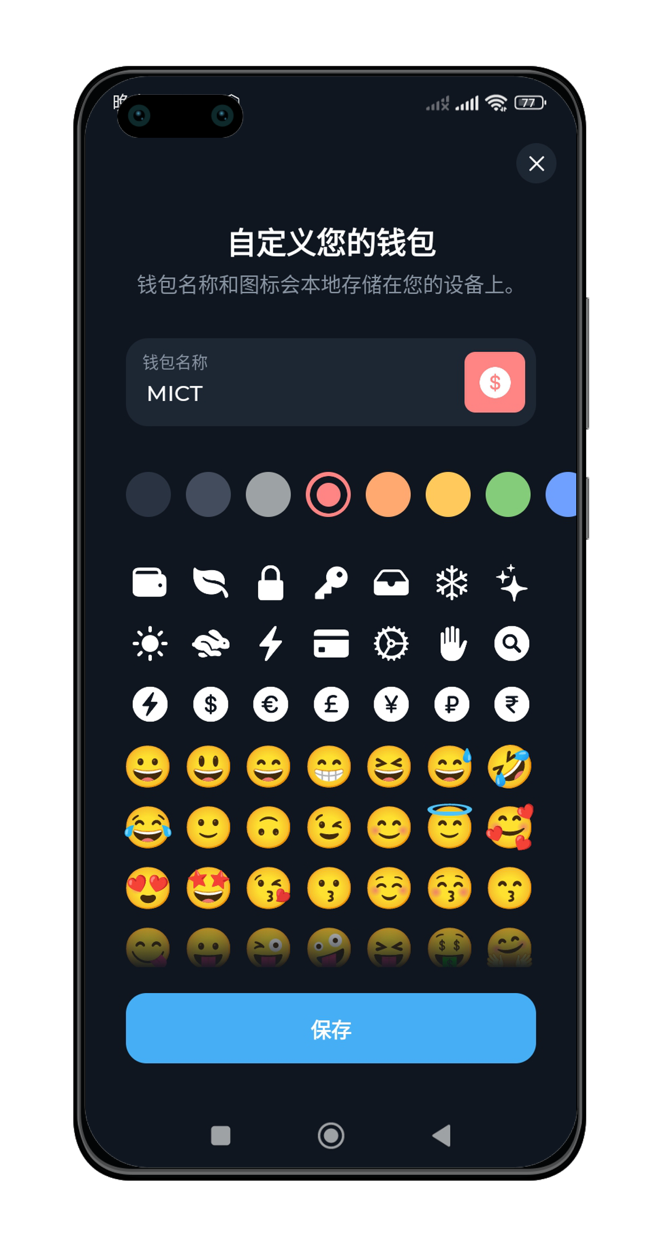
### 设置钱包名称

<img src="https://mintcdn.com/microcredit/ztxEmAWsKGCThrhV/images/wallet-tonkeeper-guide/tonkeeper-guide-03-portrait.png?fit=max&auto=format&n=ztxEmAWsKGCThrhV&q=85&s=e8731cc861e75c9eef85bc7adf3cd76c" width="400" data-path="images/wallet-tonkeeper-guide/tonkeeper-guide-03-portrait.png" />

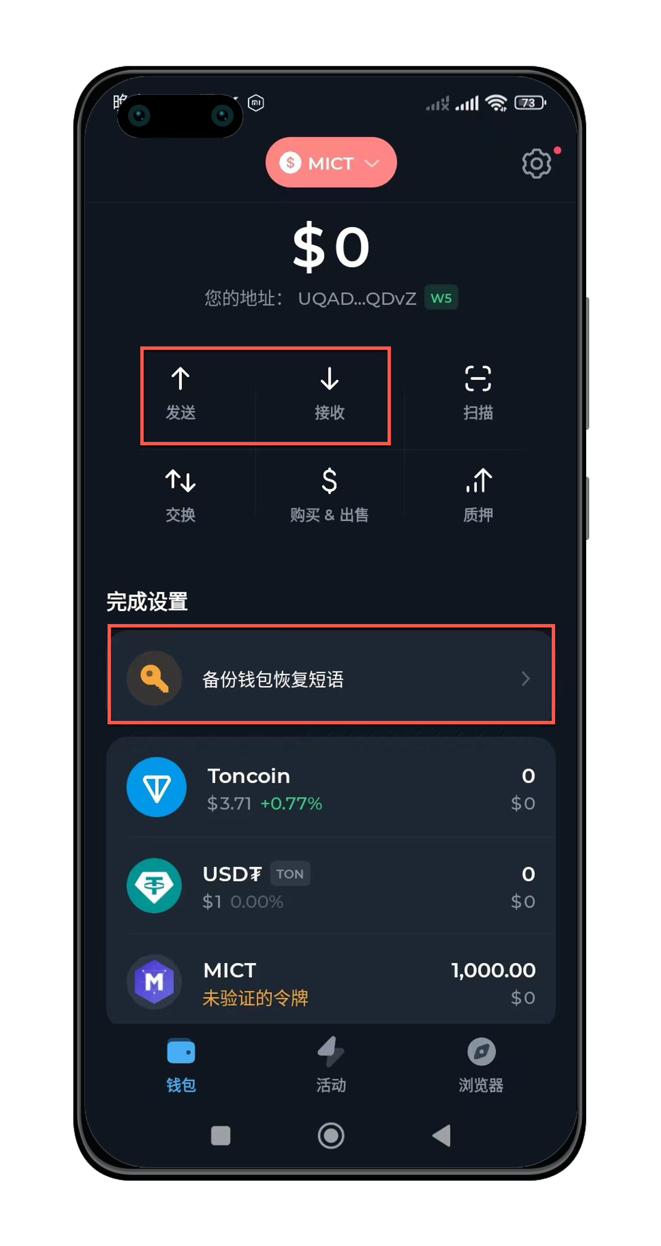
### 备份钱包短语并使用钱包收发TON及代币

<img src="https://mintcdn.com/microcredit/ztxEmAWsKGCThrhV/images/wallet-tonkeeper-guide/tonkeeper-guide-04-portrait.png?fit=max&auto=format&n=ztxEmAWsKGCThrhV&q=85&s=1ec0c02d5ef7db23eda5e787689be9e0" width="400" data-path="images/wallet-tonkeeper-guide/tonkeeper-guide-04-portrait.png" />

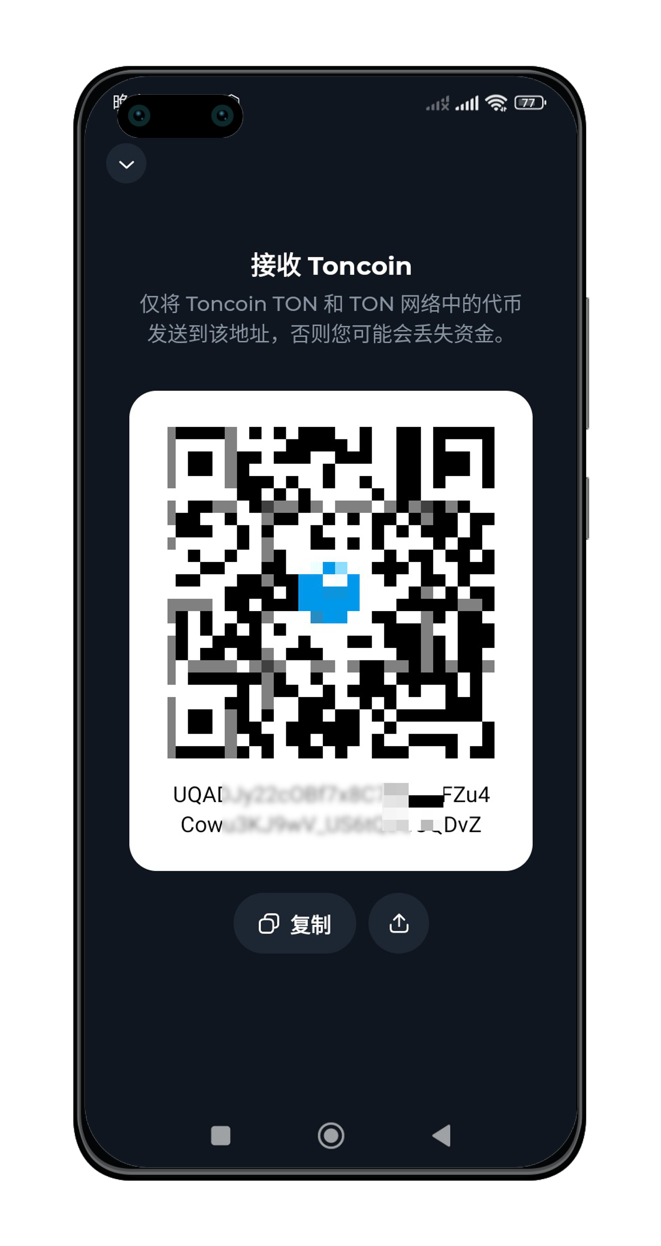
### 点击【接收】按钮后，可获得钱包地址，并可复制。

<img src="https://mintcdn.com/microcredit/ztxEmAWsKGCThrhV/images/wallet-tonkeeper-guide/tonkeeper-guide-05-portrait.png?fit=max&auto=format&n=ztxEmAWsKGCThrhV&q=85&s=6e8d415f6fb83b430f06d82e5cbad79a" width="400" data-path="images/wallet-tonkeeper-guide/tonkeeper-guide-05-portrait.png" />

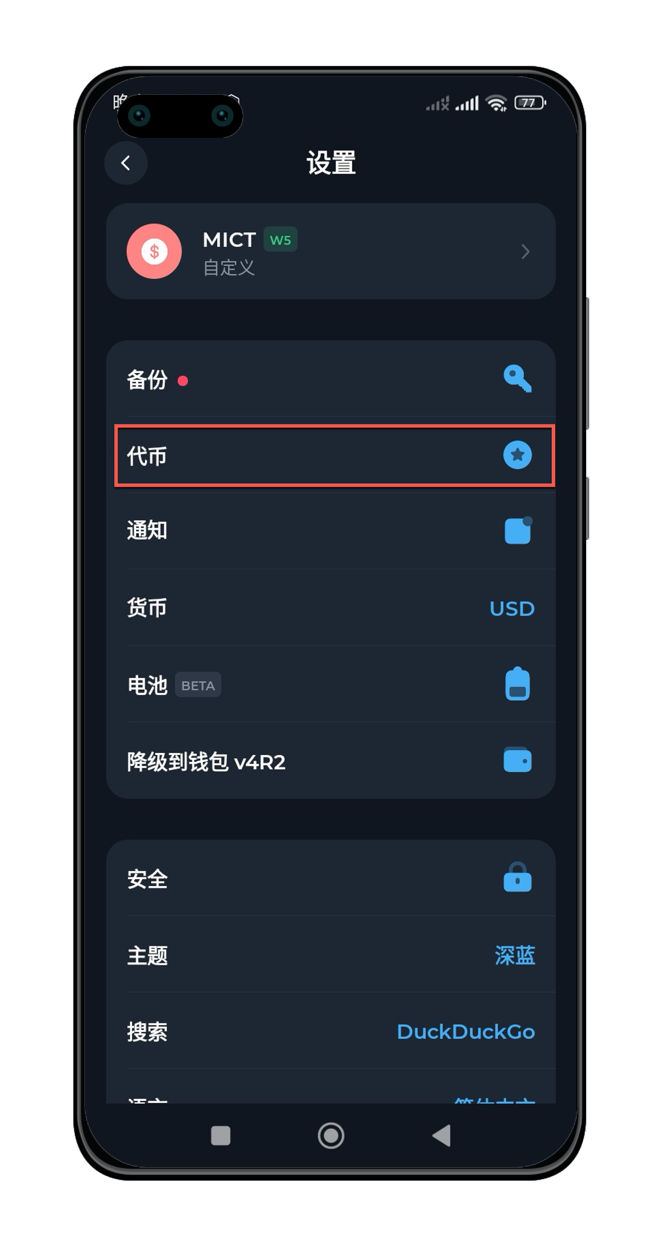
### 如果没有看到MICT代币，可通过设置添加

如果他人给你发送了MICT代币，但是钱包页面没有正常展示，可以通过设置添加。

点击【设置】按钮，选择【代币】进行查看或者设置。

<img src="https://mintcdn.com/microcredit/ztxEmAWsKGCThrhV/images/wallet-tonkeeper-guide/tonkeeper-guide-06-portrait.png?fit=max&auto=format&n=ztxEmAWsKGCThrhV&q=85&s=c0c46c4ea14e4a6c265c025a1f789ae6" width="400" data-path="images/wallet-tonkeeper-guide/tonkeeper-guide-06-portrait.png" />

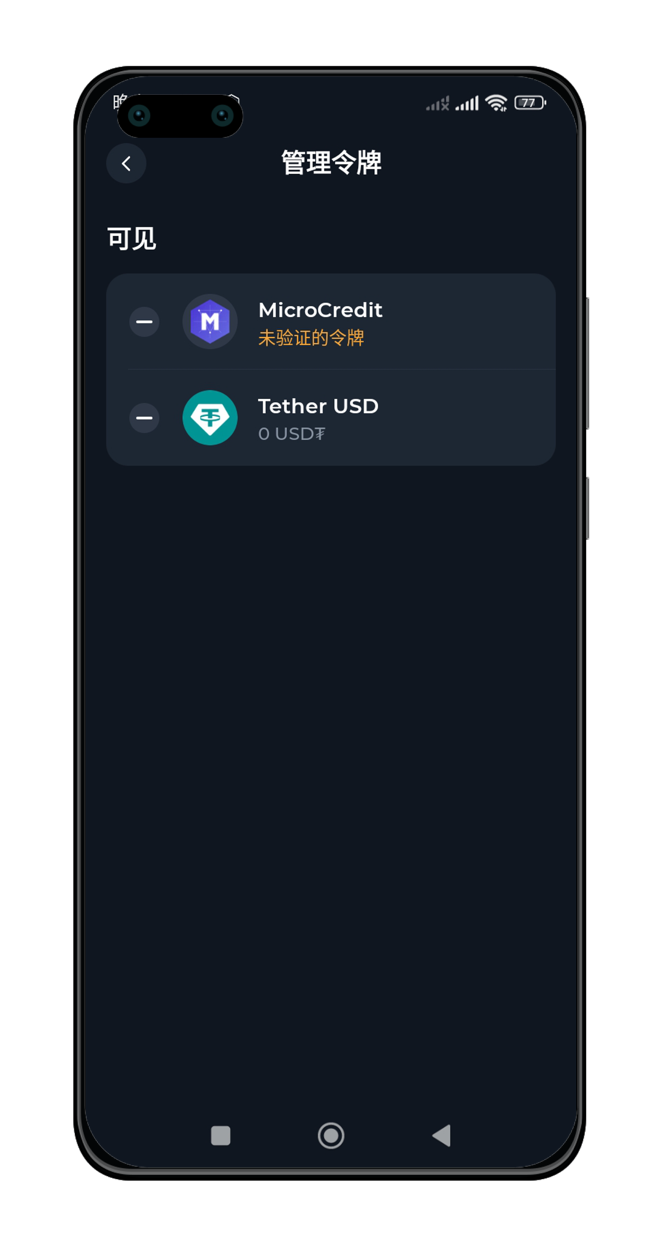
### 在【代币】页面，选择隐藏或者展示代币

<img src="https://mintcdn.com/microcredit/ztxEmAWsKGCThrhV/images/wallet-tonkeeper-guide/tonkeeper-guide-07-portrait.png?fit=max&auto=format&n=ztxEmAWsKGCThrhV&q=85&s=d0d4b5952f269e3d86d1e4322650916e" width="400" data-path="images/wallet-tonkeeper-guide/tonkeeper-guide-07-portrait.png" />

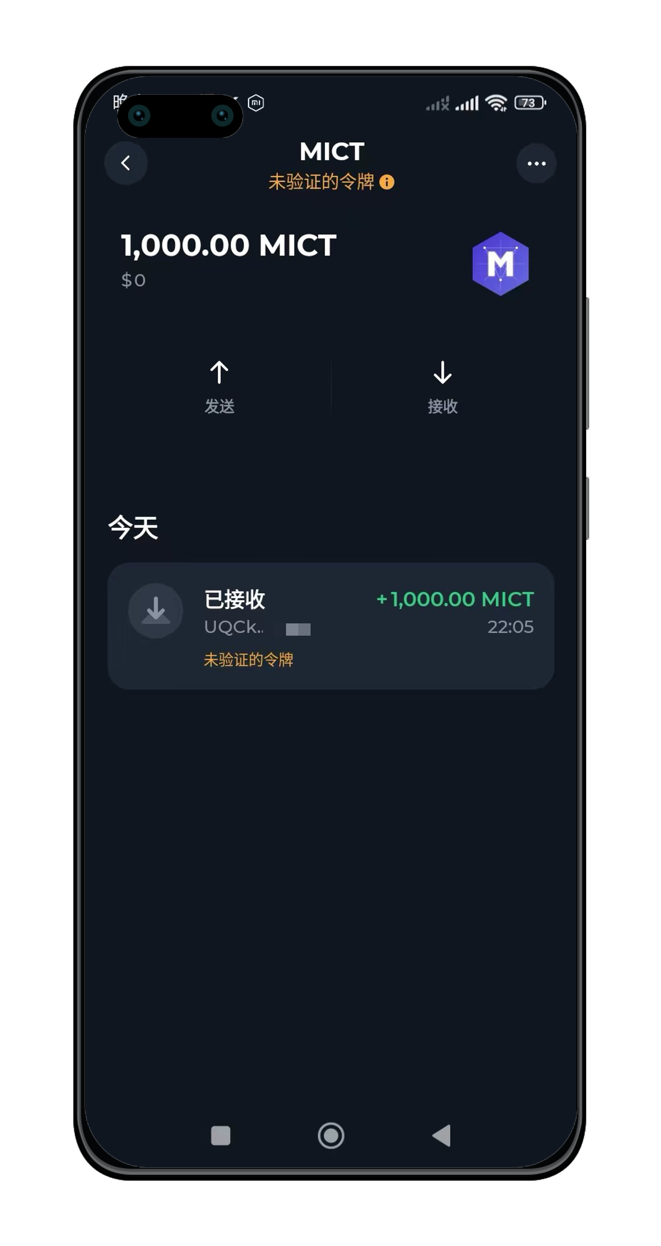
### 当代币能够正常展示后，可以查看期余额及交易记录

<img src="https://mintcdn.com/microcredit/ztxEmAWsKGCThrhV/images/wallet-tonkeeper-guide/tonkeeper-guide-08-portrait.png?fit=max&auto=format&n=ztxEmAWsKGCThrhV&q=85&s=6a42a64abe00061c3731d32ec78f383d" width="400" data-path="images/wallet-tonkeeper-guide/tonkeeper-guide-08-portrait.png" />